GeoTapp Flow. Gestion Opérationnelle.
Le centre opérationnel pour gérer clients, projets, équipes et administration en un seul endroit. Flow est la plateforme sur laquelle repose aussi TimeTracker.
KPI Dashboard & Operational Modules
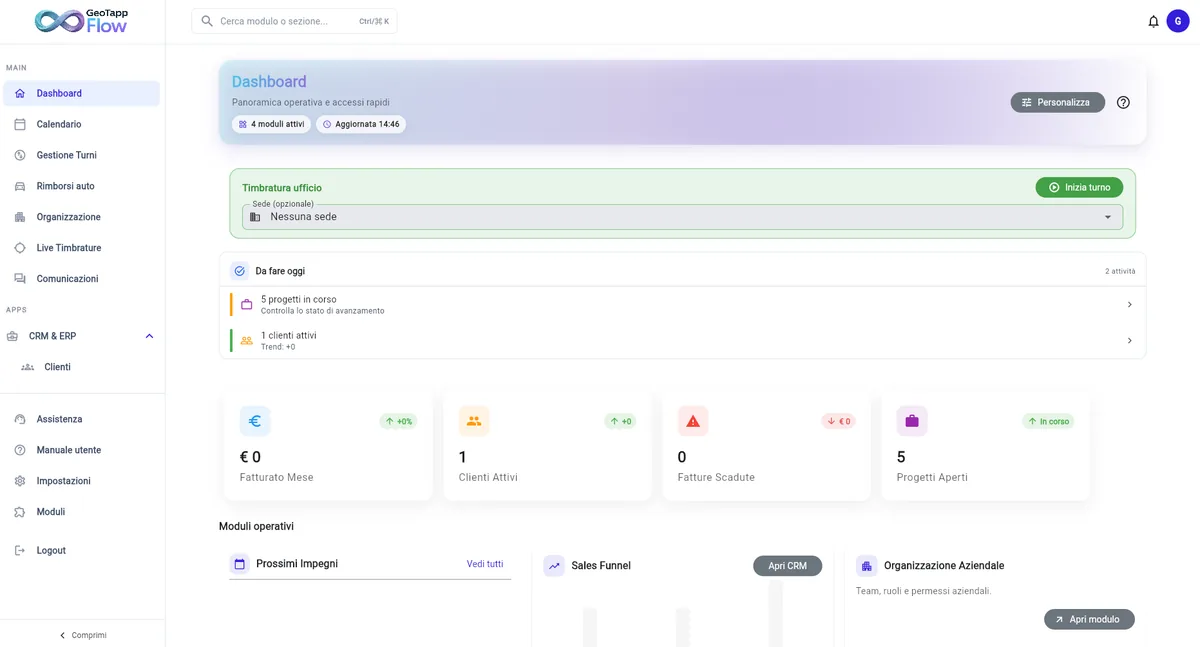
Native Android and iOS apps are being released on the stores and stay connected to live operational data from TimeTracker.
What GeoTapp Flow really does today
More than a dashboard: it connects planning, execution, billing and defensible proof of what the team actually delivered.
Management and operational hub
Flow gives office teams one control layer for clients, projects, shifts, documents, permissions, administration and operational follow-up.
Defensible proof for clients
Photos, notes, timestamps, clock-ins and field evidence stay attached to each project so the office can answer clients with facts, not assumptions.
Project timeline, ZIP export and audit trail
Generate a complete history with timeline, maps, photo proofs and session data to reduce internal disputes and support audits or customer claims.
Faster billing with fewer internal disputes
Quotes, invoices and optional Fatture in Cloud sync work on what was actually done on the field, so billing is faster and easier to defend.
Autorisation GPS automatique pour chaque salarié
Conforme dès le premier jour, ou pas de pointage.*
Lorsque vous invitez un nouveau salarié, Flow génère automatiquement l'avis de confidentialité GPS conforme au RGPD et l'envoie pour signature numérique. Le salarié remplit ses données, lit le document et signe en un clic, tout en ligne, sans papier.
Le PDF signé est archivé automatiquement et vous voyez en temps réel qui a signé et qui ne l'a pas fait. Plus de feuilles volantes, plus de risque de sanctions : chaque consentement est tracé avec date, heure et signature numérique.
Conforme au RGPD et aux recommandations de la CNIL sur la géolocalisation des salariés. Le dispositif respecte le Code du travail (art. L.1121-1) et le principe de proportionnalité : pas de suivi continu, uniquement au pointage.
* La loi (RGPD Art. 13, en France aussi le Code du travail et les recommandations CNIL) exige que chaque salarié signe un avis de confidentialité avant d'être géolocalisé. La plupart des logiciels GPS ne gèrent pas cela : le risque juridique reste à l'employeur. GeoTapp génère automatiquement l'avis, le fait signer numériquement et bloque l'accès GPS tant qu'il n'est pas signé. Aucun autre logiciel sur le marché ne le fait.
Built for office teams that need clarity
Owners, administration and coordinators use Flow when they need fewer internal disputes, clearer responsibilities and a reliable operational cockpit.
Connected to TimeTracker in real time
Clock-ins, field activity, photo proofs and project execution data return into Flow in real time for governance, reporting and customer-facing proof.
Capacités opérationnelles
Chaque module est conçu pour un contrôle réel des interventions terrain. Cliquez pour explorer.
Gestion des missions
Créez et gérez les interventions techniques. Affectez les tâches aux techniciens, suivez l'avancement et gardez tout tracé par mission.
Affectation des tâches
Distribuez le travail aux techniciens avec précision. Communiquez les instructions, les délais et les priorités opérationnelles de manière structurée.
Rapports et facturation
Générez des rapports structurés à partir de chaque mission. Exportez la documentation et facilitez la facturation avec des données terrain réelles.
Calendrier des interventions
Planifiez les interventions, visualisez le calendrier opérationnel et gérez la disponibilité des équipes sans chevauchements.
Gestion des ressources
Contrôlez les matériaux, équipements et ressources opérationnelles nécessaires pour chaque intervention terrain. Aucune mauvaise surprise.
Planification du travail
Organisez le travail en phases, tâches et délais. Gardez le projet sous contrôle sans tableurs ni messages WhatsApp.
Documentation des interventions
Collectez des preuves photos, notes opérationnelles et documents signés pour chaque intervention. Le travail effectué reste vérifiable.
Liaison terrain-bureau
Les données collectées par TimeTracker arrivent dans Flow en temps réel. Le terrain et le bureau travaillent sur les mêmes données opérationnelles.
Visibilité opérationnelle
Tableau de bord opérationnel en temps réel. Sachez toujours combien d'interventions sont ouvertes, en cours ou terminées aujourd'hui.
Prenez le contrôle réel de votre terrain.
Questions fréquentes
What is GeoTapp Flow?
GeoTapp Flow is the operational management platform for companies with field technicians. It lets you create jobs, assign tasks, monitor progress and produce verifiable reports in real time from the office.
Does GeoTapp Flow work offline?
GeoTapp TimeTracker (the mobile app for technicians) works offline and syncs GPS data and photos when connectivity is restored. Flow (the management panel) requires an internet connection.
Does GeoTapp Flow integrate with other management software?
GeoTapp Flow supports data export for billing and payroll. Direct integration with third-party management systems is available on request.
How many technicians can GeoTapp Flow manage?
GeoTapp Flow scales from teams of 3 to 300+ operators across multiple sites. Team and Business plans include advanced features for larger teams.
Can clients dispute reports generated by Flow?
No. GeoTapp reports are cryptographically sealed and verifiable via GeoTapp Verifier. Clients can independently verify data integrity without accessing your account.
Does GeoTapp Flow show where technicians are in real time?
No, and that is on purpose. Location is recorded only when a job opens and closes, not continuously: Flow tells you the work started at the right place and time, it does not make you follow a dot on a map all day. That is the line between proof of work and surveillance.
Which businesses is GeoTapp Flow built for?
For companies whose teams work off-site: cleaning, security, maintenance, installers, electricians, plumbers and multi-service firms. If your operators spend the day in the field rather than at a desk, Flow was built for that.
How do I assign jobs to teams in GeoTapp Flow?
You create the job from the office, assign the technician or crew, and the operator finds it in the TimeTracker app. When the job is closed the report comes back into Flow, already verifiable, with no one to chase to find out how it went.
Idéal pour