Cleaning Verification with GPS Photos: A Guide for Facility Managers
“The cleaning wasn’t done.” Four words that cost cleaning companies £2,500 a month in disputed invoices and lost contracts. Your teams cleaned every room, every day, exactly as specified. The client, an office block, a hospital, a hotel, claims otherwise. Without proof, you concede. Over time, you lose the contract.
This is the structural challenge unique to the cleaning industry: your work disappears the moment it’s completed. There’s no installed system to point at. No delivered product to sign for. There’s only a clean space, which gets used and gets dirty again. The evidence problem isn’t a nuisance. It’s the single biggest commercial vulnerability in contract cleaning.
The evidence gap that costs you contracts
The pattern repeats across the sector. Cleaning is carried out between 6am and 9am. The client arrives at 9:30 and finds something that doesn’t meet their expectations, or says they do. By then, there’s no proof those four hours of work happened at all. The result is systematic disputes, “goodwill” discounts that become permanent, and contracts lost not because the work was poor but because it couldn’t be demonstrated.
Pick your most-disputed cleaning site, run GPS photo verification on it for thirty days, and let the dispute count decide the rollout.
No credit card, up and running in 2 minutes.
Open your trialUnder UK GDPR and the Data Protection Act 2018, any verification system must handle location data and images of work areas responsibly. The ICO guidance on workplace monitoring applies here, you need a lawful basis for collecting GPS data from your employees, transparent communication about what’s being tracked, and proportionate data retention. Getting this right isn’t just compliance, it’s what makes your evidence defensible when a client challenges an invoice.
How GPS photo verification works in practice
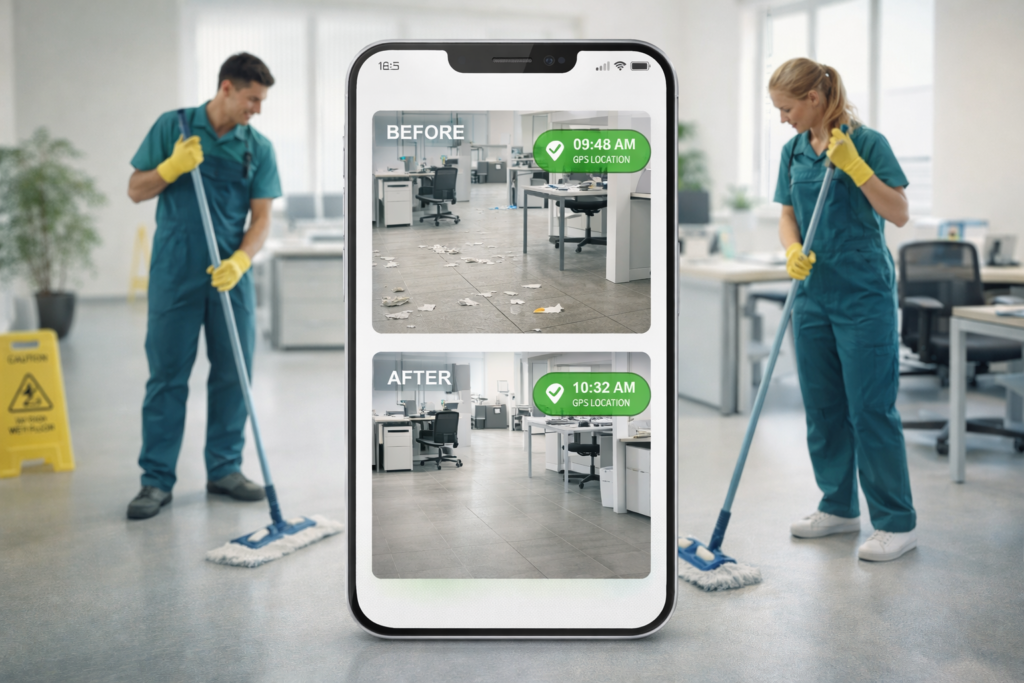
The workflow is deliberately simple because it has to work for cleaning operatives at 6am who are focused on their job, not on technology. Before starting an area, the operative takes a “before” photo showing the initial state. The photo is saved automatically with GPS coordinates, a server-side timestamp, and the area identifier. After completing the area, they take an “after” photo. Same system: GPS, timestamp, area.
At shift end, the system automatically generates a report containing every before/after pair, organised by area, with exact times and geolocation. The facility manager can access it via a secure link, no app installation required on their side.
What the facility manager sees in the report
The verification report includes timestamped before/after photo pairs for each area, GPS coordinates confirming the operative was physically present at the location, the duration spent on each zone, and an overall compliance score against the contractual specification. The facility manager gets a single link, opens it in their browser, and can verify the entire shift’s work in under two minutes.